 Isaac Lab on H100
Isaac Lab, end to end
on H100
No RTX GPU anywhere.
- Trainheadless, on the H100
- Recordevery link's pose, physics only
- Watchin your browser, or as an mp4
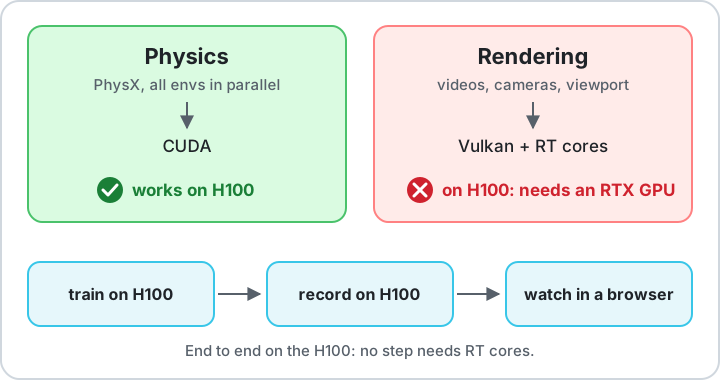
NVIDIA lists GPUs without RT cores, like the H100, as unsupported for Isaac Sim. That is about rendering. The physics runs on CUDA, so you can train on an H100 and watch the result without ever rendering on it.
The 30-second answer
Isaac Sim on H100: no RT cores, and that's fine for training
Headless RL training
PhysX runs on CUDA. Use --headless, skip cameras and --video, and train thousands of environments in parallel.
No RT cores, often no Vulkan
The RTX renderer needs RT cores. On servers with the compute-only driver there is no Vulkan or EGL either, so nothing renders at all.
Render elsewhere, or not at all
Record the motion on the H100 and watch it in your browser. Need Isaac Sim's own renderer? Copy the checkpoint to an RTX machine.
NVIDIA's Isaac Sim 5.1 requirements: GPUs without RT Cores (A100, H100) are not supported.
That line is about the renderer. Headless training never calls it.
Startup log
Seeing "No device could be created"? You're probably fine
At startup Isaac Sim tries to create a Vulkan device for the renderer, logs a wall of red, and carries on without it. These are the exact lines from our H100 logs:
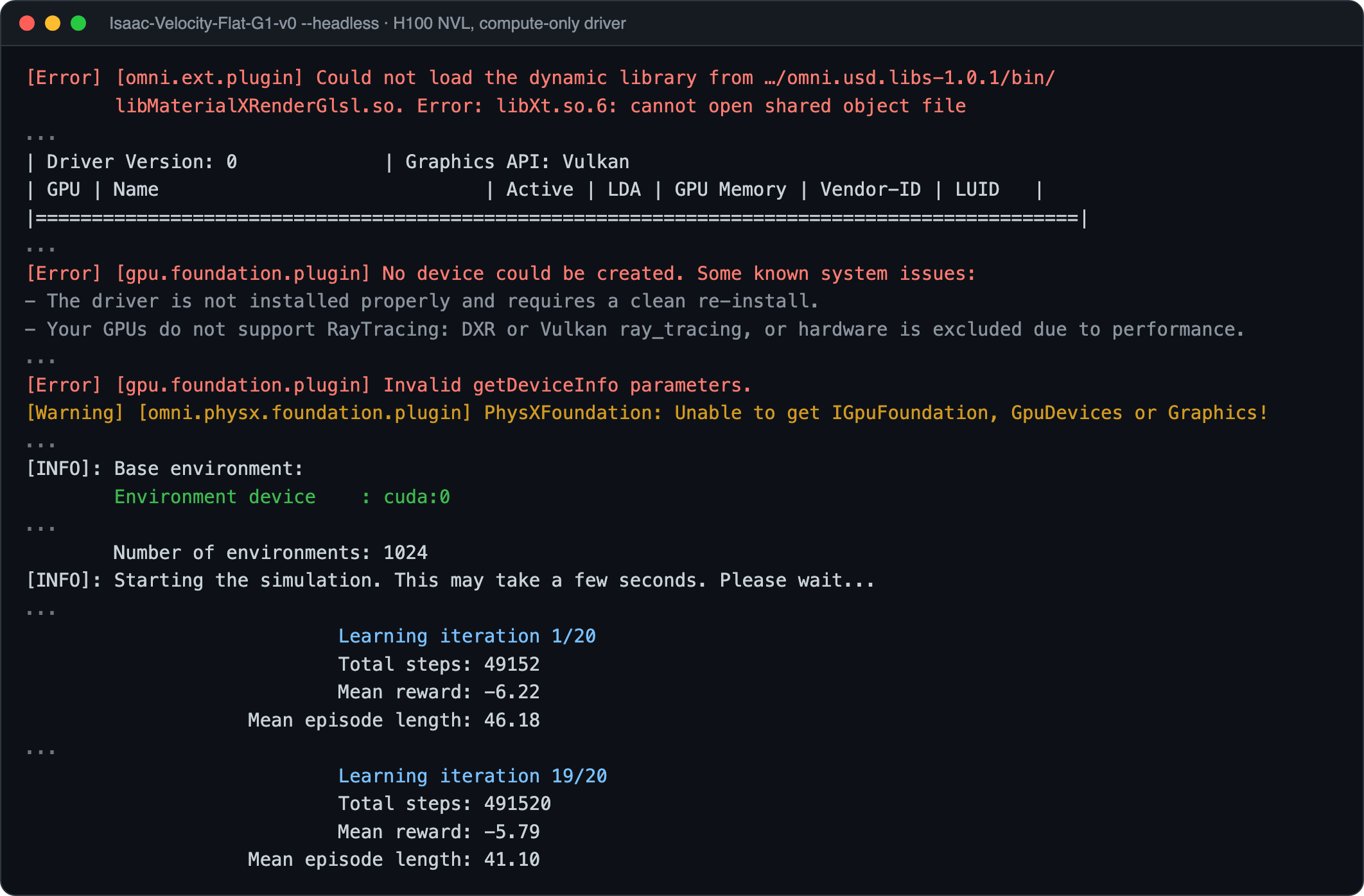
The same lines as text, so you can search for yours:
[Error] [gpu.foundation.plugin] No device could be created. Some known system issues:
[Error] [gpu.foundation.plugin] The chosen activeGpu index 0 is higher than the available GPUs.
[Error] [gpu.foundation.plugin] Invalid getDeviceInfo parameters.
[Error] [omni.gpu_foundation_factory.plugin] Failed to create any GPU devices, including an attempt with compatibility mode.
[Error] [omni.kit.renderer.plugin] GPU Foundation is not initialized!
[Error] [omni.kit.renderer.plugin] Graphics plugins not available
[Error] [omni.ui] Failed to create texture GPU data! [512 x 64, 1 mips]
[Warning] [omni.physx.foundation.plugin] PhysXFoundation: Unable to get IGpuFoundation, GpuDevices or Graphics!
| Driver Version: 0             | Graphics API: Vulkan
Could not load the dynamic library ... libXt.so.6: cannot open shared object file
sh: 1: zenity: not found
The rule: if the log then prints Environment device : cuda:0 and starts Learning iteration blocks, every red line above it was harmless.
The hidden cause
Nothing renders at all? Check the driver package
Many data-center servers use the compute-only NVIDIA driver (nvidia-headless-*-server). It leaves out the graphics libraries, so there is no Vulkan and no EGL: not even MuJoCo can render. Same H100, same software, only the driver package differs:
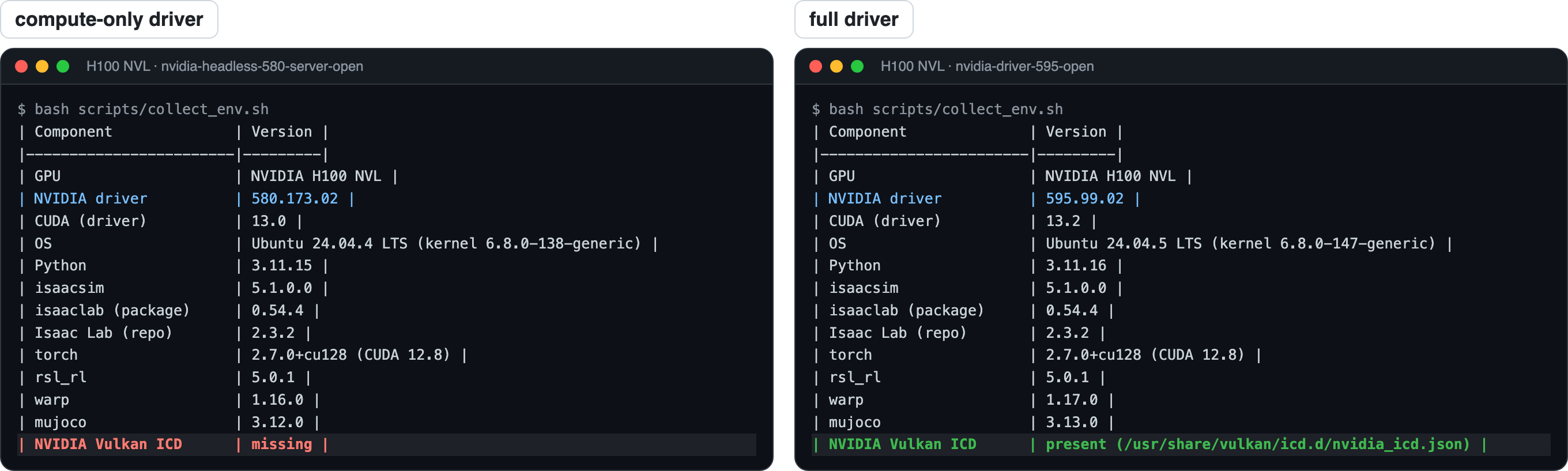
Training works with either. If you also want MuJoCo rendering on the server, ask your admin for the full driver (nvidia-driver-*-open). scripts/collect_env.sh tells you which one you have.
Tested
What works on our H100
| Task | H100 | RTX GPU |
|---|---|---|
| Headless RL training | ✓ works | ✓ |
| Loading a robot USD | ✓ works | ✓ |
| URDF → USD conversion | ⚠ fails on some servers | ✓ |
| MuJoCo rendering | ⚠ only with the full driver | ✓ |
| Isaac Sim videos, cameras, viewport | ✕ | ✓ |
A community-tested setup, not supported by NVIDIA. Full details per driver and machine: tested versions. A100: same reason (no RT cores), so it should behave the same, but we have not tested it.
Quickstart
Train Isaac Lab on an H100 in three steps
Check your machine
bash scripts/collect_env.sh # GPU, driver, versions, VulkanInstall Isaac Lab 2.x
The official conda + pip install, nothing H100-specific: install notes.
Train the G1 walking task, headless
cd <ISAACLAB_DIR>
./isaaclab.sh -p scripts/reinforcement_learning/rsl_rl/train.py \
  --task Isaac-Velocity-Flat-G1-v0 --headless --num_envs 4096 --max_iterations 20
Look for Environment device : cuda:0. Drop --max_iterations to train the full 1500 iterations; that is the policy in the video above. Then watch it. More: SONIC fine-tune and flags.
New in v0.2 · record and watch
Watch your policy in the browser. The H100 never renders.
Isaac Lab still does the physics on the H100. Record what the robot does, then replay it with viser: your browser draws it, so the server never renders. This works even on servers with the compute-only driver.
Drag to orbit, scroll to zoom. Physics: Isaac Lab on an H100. Drawing: your browser.
Record a rollout on the H100 (physics only)
./isaaclab.sh -p scripts/record_rollout.py --task Isaac-Velocity-Flat-G1-Play-v0 \
  --policy <RUN_DIR>/exported/policy.pt --out rollouts/g1_walk.npz
Replay it in your browser
uv run --with viser --with trimesh python scripts/replay_viser.py \
  --rollout rollouts/g1_walk.npz --urdf <URDF> --follow   # then ssh -L 8080:localhost:8080
Share it: a web page or an mp4
--save g1_walk.viser makes a file for viser's static player (that is the replay above). --video g1_walk.mp4 renders frames in a headless browser on the CPU, even on the H100 server. With EGL, scripts/render_mujoco.py is faster. Full guide: no RTX at all.
A replay of the simulated poses, not Isaac Sim's RTX renderer. Great for state-based policies; policies that read simulated camera images still need an RTX GPU.
Ready to load
Pre-converted Unitree G1 USD
The Unitree G1 exactly as SONIC uses it, already converted from URDF. Download it if you train SONIC, or if URDF conversion fails on your server.
bash scripts/download_usd.sh   # Hugging Face download, sha256 check, unpacks to usd/g1_sonic/
python scripts/convert_robot.py --verify usd/g1_sonic/g1_sonic.usd --base_height 0.76
Hosted at huggingface.co/datasets/Kyry10/unitree-g1-usd. License: Unitree meshes (BSD 3-Clause), URDF edits by BeyondMimic (MIT) and NVIDIA (Apache 2.0). Converting your own robot: robot USD guide.
The guide
Everything we found, written down
Plus eight scripts: environment check, USD download and conversion, headless training, recording and replay.
FAQ
Questions people ask
Does this work on an A100?
It should: the A100 has no RT cores either, so it should behave just like the H100. We have not tested it yet. If you run Isaac Lab on an A100 (or H200, B200, L40S), please send a GPU report with the output of scripts/collect_env.sh; every report goes into the table, with credit.
What about Isaac Lab 3.0?
Isaac Lab 3.0 came out on 2026-10-20. Its default install runs without Isaac Sim, on the Newton physics backend, and its docs say headless Newton simulation does not require RTX hardware. Many projects, SONIC included, are built on Isaac Lab 2.x and will stay there for a while; this guide is for them. A 3.x section is planned for v0.3.
Can I use mjlab instead?
Yes. mjlab puts Isaac Lab's API on top of MuJoCo Warp, with no Isaac Sim at all. We train motion-tracking policies with it on a compute-only H100, and the log is perfectly clean. Good choice if you don't need USD scenes, RTX cameras or PhysX.
Docker, Apptainer or Slurm?
Isaac Lab ships Docker images and a cluster guide for Singularity/Apptainer. The same rule applies inside containers: training needs only CUDA. The repo includes a Slurm starting template; containers and Slurm get their own section in v0.3. See alternatives.
Can I render on an H100 with the full driver?
With the full driver, Isaac Sim does find a Vulkan device on the H100 and the startup log is clean. Rendering images is still outside what NVIDIA supports, and other users report crashes or noisy images with cameras on H100 and A100. For Isaac Sim videos and camera data, use an RTX GPU. To just watch a policy, the browser replay needs no RTX at all.
Roadmap
What's next
Headless on H100
Install, train, every error explained, ready G1 USD.
End to end on H100
Record on the H100, replay in the browser with viser, mp4 without a GPU, MuJoCo option.
Isaac Lab 3.x, containers, Slurm
Newton without Isaac Sim, Apptainer images, cluster jobs.